LinkedIn
 Facebook
 Email
Email
 Twitter
 Quickly evaluate current rents with QuickView™ Rent Estimates

How to Analyze Rental Properties with Rentometer’s Deal Worksheet
Investing in rental properties isn’t just about finding deals, it’s about knowing whether a deal actually works.
Whether you’re evaluating a single-family rental or a small multifamily property, you need a fast way to estimate rents, model expenses, test financing scenarios, and understand potential returns before making an offer.
That’s where Rentometer’s Deal Worksheet comes in.
The Deal Worksheet helps investors quickly analyze rental opportunities using real market rent data and customizable investment assumptions. Instead of building spreadsheets from scratch, you can model cash flow, estimate returns, and pressure-test deals in minutes.
Stay connected
Get rental market insights delivered straight to your inbox.
How It Works
Getting Started
First, you need to log into your Rentometer Pro account. Once logged in, navigate to the Deal Worksheet from your Rentometer dashboard.
Not a Pro subscriber? View plans and pricing to learn more.
Analyze a Single-Family Rental
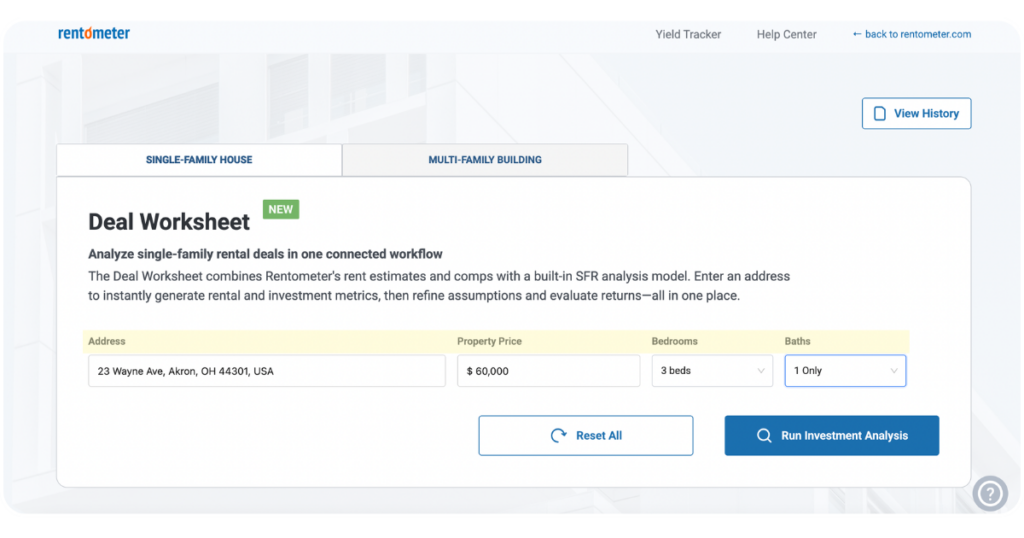
1. Enter Property Details
Start by entering basic information about the property, including:
- Property address
- Purchase price
- Property type
- Bedroom and bathroom count
Press the ‘Run Investment Analysis’ button.
2. Review Estimated Rental Income
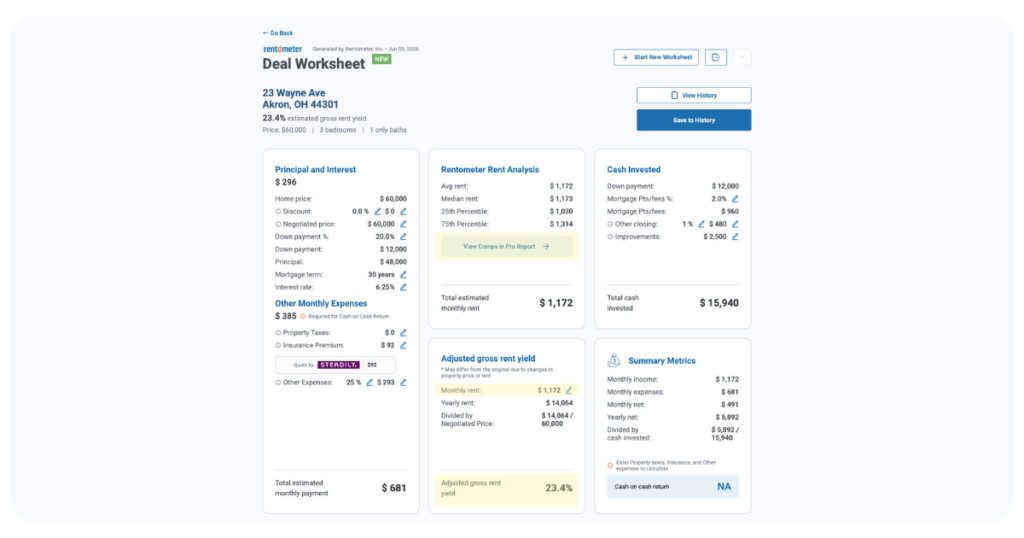
The Deal Worksheet incorporates Rentometer’s hyper-local rent data to give you a quick snapshot of the property’s rental income potential. For the subject property, the worksheet displays:
- Average rent
- Median rent
- 25th percentile rent
- 75th percentile rent
For a deeper look at the rental market, open the Pro Report linked directly in the Deal Worksheet. The Pro Report provides additional market insights, including:
- Estimated monthly rent
- Comparable rental data
- Historic trends
- Public record data
Review the comparable rentals in the Pro Report to see how similar properties are priced in the local market. Based on the property’s condition, features, location, and the comps you consider most relevant, you can then update the monthly rent amount in the Adjusted Gross Rent Yield section.
When you update this field, the Deal Worksheet automatically recalculates the gross rent yield, giving you a more customized view of the property’s income potential.
3. Customize Your Assumptions
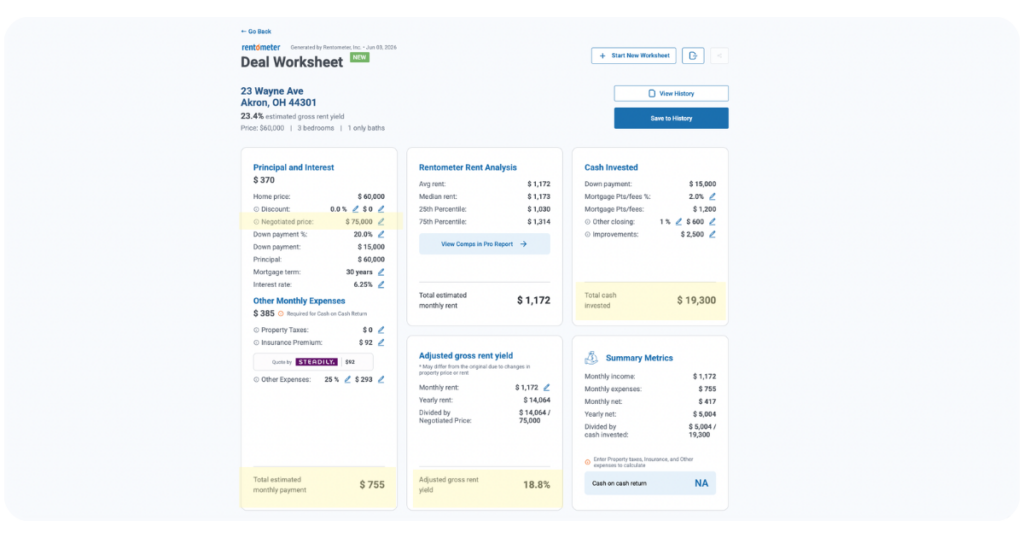
Every deal is different.
Adjust variables such as:
- Down payment
- Interest rate
- Property taxes
- Insurance
- Property management fees
- Maintenance reserves
- Improvement or rehab budgets
As you make changes, the Deal Worksheet automatically updates projected returns.
4. Evaluate Your Returns
Instantly view key investment metrics, including:
- Cash-on-cash return
- Gross rent yield
- Total cash invested
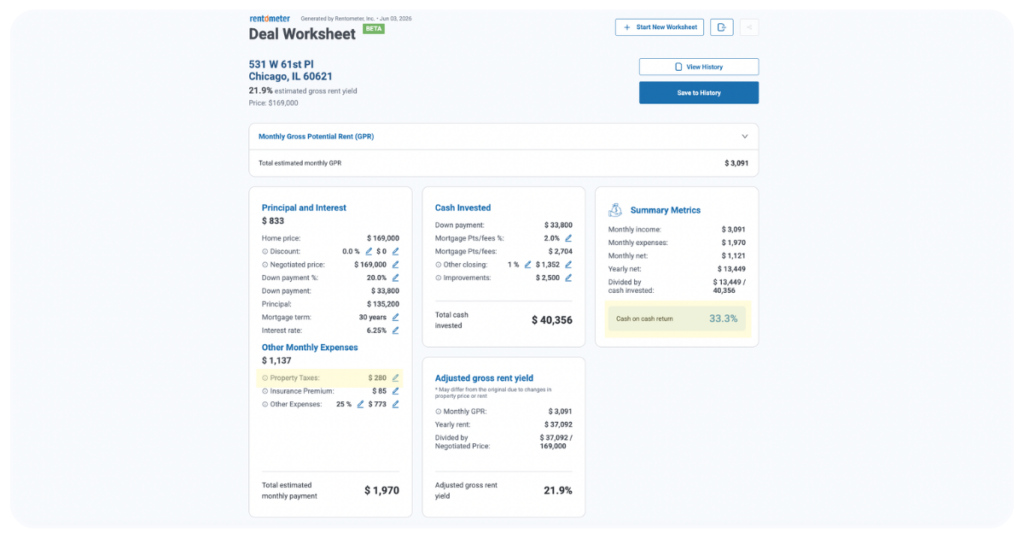
Important to note, you also must fill out the property tax field to see the complete cash-on-cash return projection.
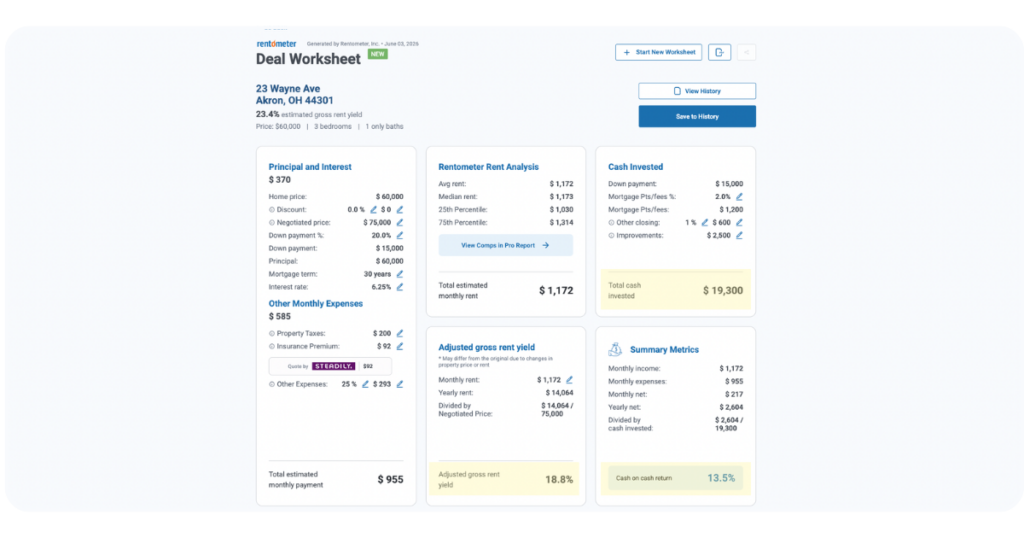
This makes it easy to compare opportunities and determine whether a deal meets your investment criteria.
Analyze a Multifamily Property
The Deal Worksheet also supports multifamily property analysis, making it easier to evaluate duplexes, triplexes, fourplexes, and small apartment buildings.
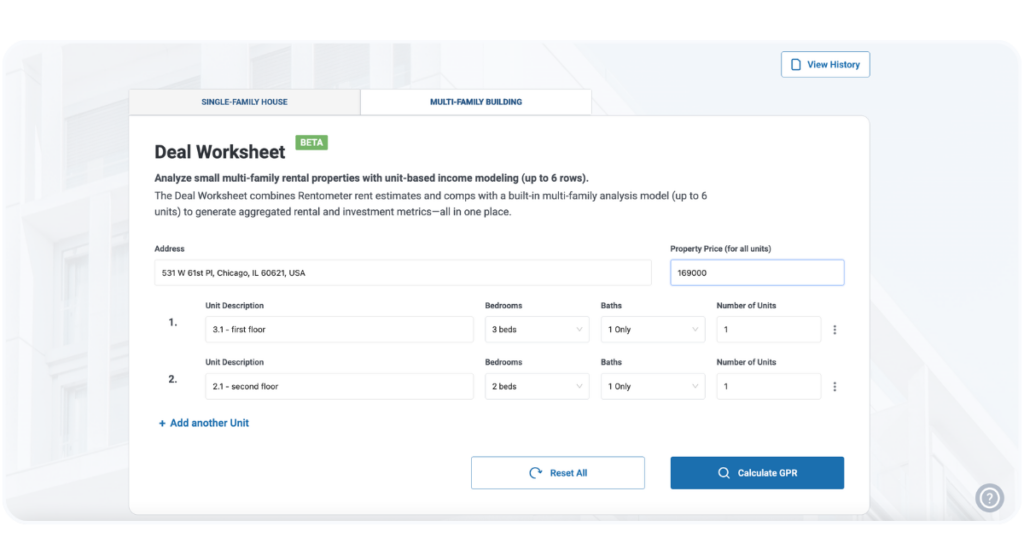
1. Enter Unit-Level Details
For multifamily properties, add information for each unit type, including:
- Number of units
- Bedrooms and bathrooms
- Unit-specific rent estimates
The Deal Worksheet automatically generates rent estimates by unit type using Rentometer data.
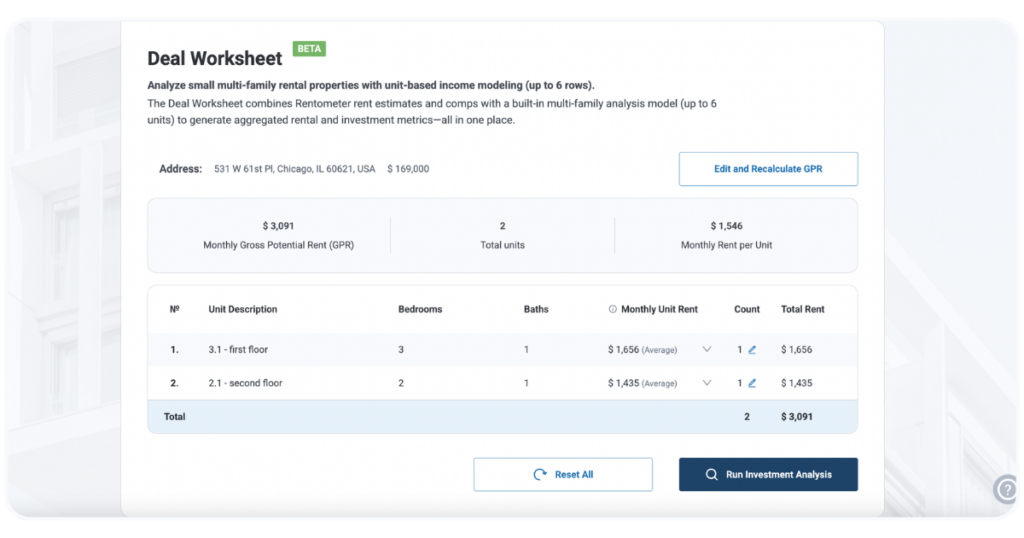
2. Review Gross Potential Rent
The tool aggregates rental income across all units and calculates:
- Gross potential monthly rent
- Annual rental income
- Gross rent yield
- Preliminary investment returns
This provides a fast first-pass analysis of the property’s performance potential.
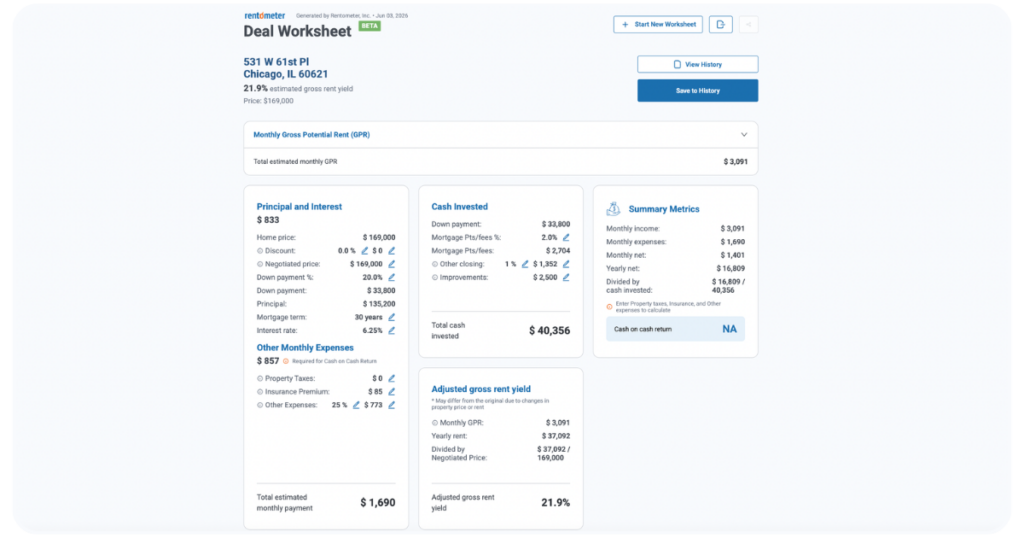
3. Pressure-Test the Numbers
Just like with single-family rentals, you can adjust:
- Financing assumptions
- Operating expenses
- Vacancy assumptions
- Capital improvement budgets
- Purchase price scenarios
Want to see what happens if you negotiate a lower purchase price? Increase renovation costs? Adjust financing terms?
The Deal Worksheet updates your projected returns instantly.
4. Compare Scenarios Before Making an Offer
Many multifamily deals look very different after a few assumption changes.
By modeling different purchase prices, rent assumptions, and insurance costs, investors can quickly identify:
- Target offer prices
- Return thresholds
- Cash flow potential
- Deal-breaking risks
Why Investors Use the Deal Worksheet
The Deal Worksheet helps investors move from opportunity to analysis faster.
Instead of relying on spreadsheets, manual calculations, or rough estimates, you can:
- Analyze single-family and multifamily deals in minutes
- Pull rent estimates directly into your underwriting workflow
- Test different financing and pricing scenarios
- Estimate cash flow and returns before making an offer
- Make more confident investment decisions using real market data
Start Analyzing Deals Faster
The Deal Worksheet combines Rentometer’s trusted rent data with powerful investment analysis tools—helping investors quickly determine whether a property deserves a closer look.
Whether you’re evaluating a single-family rental or multi-unit building, the Deal Worksheet helps you move from listing to decision with confidence.
The Deal Worksheet provides estimates for informational purposes only. Results are based on user-provided assumptions and Rentometer rent data. Always conduct your own due diligence and consult qualified professionals before making investment decisions.
Stay connected
Get rental market insights delivered straight to your inbox.